
Disclosure: AI Tricks is reader-supported. This guide contains an affiliate link to PopAi. If you sign up through our link, we may earn a commission at no extra cost to you. It does not change our review or the price you pay.
Making a presentation used to be the slowest part of any job. You had the ideas in your head, or in a long report, and then you spent hours turning them into slides: picking a layout, shortening paragraphs into bullet points, finding pictures, fixing fonts, and moving boxes around until the deck looked decent. Most people do not enjoy that work. They just need the slides ready for Monday morning.
PopAi takes the other path. You tell it what the presentation is about, or you upload the document that already has the information, and it builds the deck for you. It suggests an outline first, so you can fix the story before it makes the slides. Then it writes the slide text, picks the layout, adds pictures, and lets you edit everything in your browser. When the deck is ready, you share a link or download it as a PowerPoint or PDF file.
PopAi is not only a slide maker. The same account includes tools that read and answer questions about your PDFs, write and rewrite text, chat with leading AI models, and generate images. In this guide, we explain what PopAi is, what each tool does, the real pricing and free-plan limits, and how to use it step by step. We also compare it with Gamma, Beautiful.ai, and Canva, so you can see which tool fits your work. Prices change often, so always check the official PopAi pricing page before you buy.
 Try PopAi Free — Make Your First Slides →
In This Guide
- 1. What is PopAi?
- PopAi Plans at a Glance
- Key Features
- PopAi Pricing
- How to Use PopAi
- PopAi vs Alternatives
- PopAi for Everyday Jobs
- What PopAi Cannot Do
- Pros and Cons
- Who Should Use PopAi
- Frequently Asked Questions
- Final Thoughts
What is PopAi?
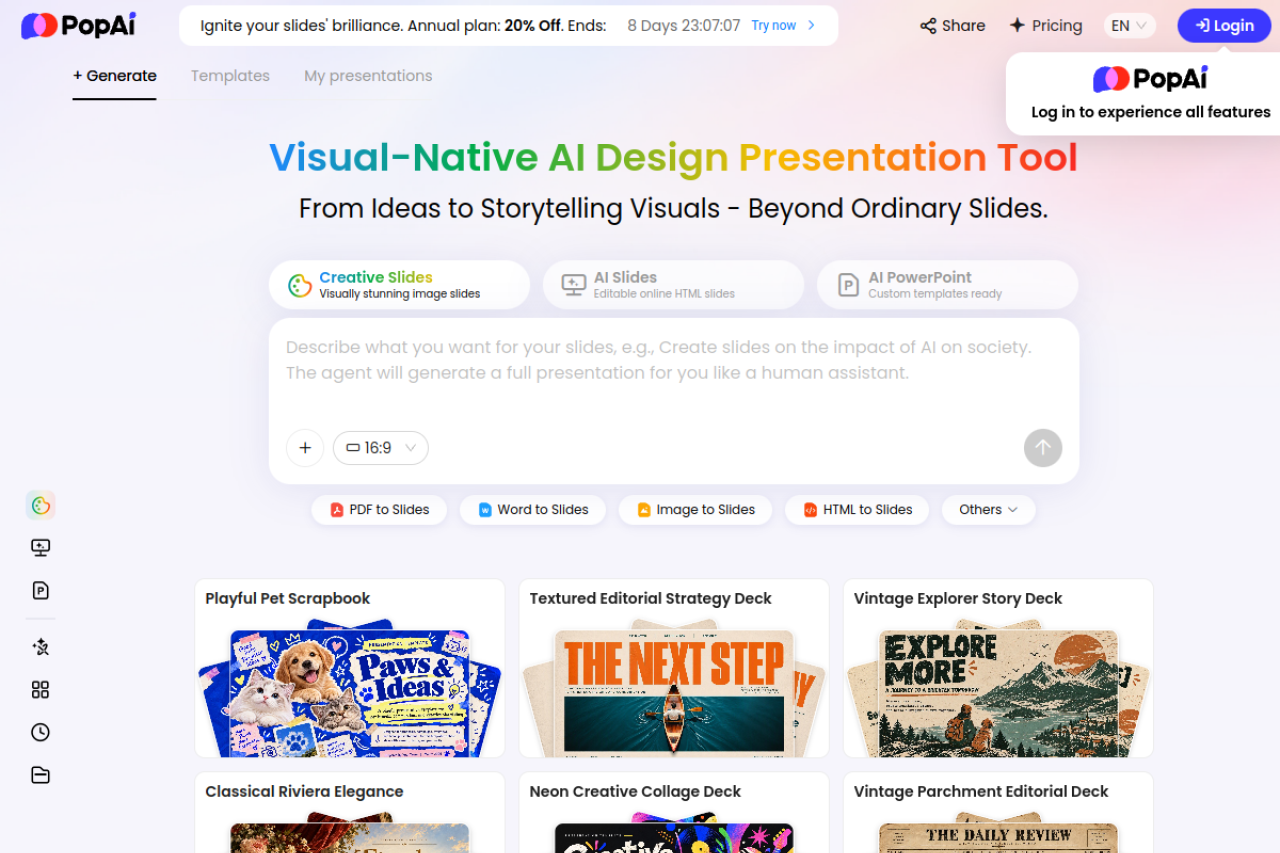
PopAi is an AI presentation and content workstation that runs in your browser at popai.pro. Its home page introduces it simply: a "Visual-Native AI Design Presentation Tool" that takes you "From Ideas to Storytelling Visuals — Beyond Ordinary Slides." You start with a topic or a file, and PopAi turns it into a slide deck you can edit online and export as a PowerPoint or PDF.
PopAi comes from 01.AI Pte. Ltd., a Singapore company. The product started as an AI chat and document tool, and the presentation maker is now its main feature. That history matters, because the slide maker is built on top of a full AI workspace: the same account can read a PDF and answer questions about it, write and rewrite text, chat with AI models, and generate images. The slides are not a separate app bolted on the side — they use the same AI, the same credits, and the same account.
There are three ways to make slides in PopAi. Creative Slides are visually rich, image-led decks that look more like a designed magazine than a normal office presentation. AI Slides are editable online HTML slides that you build and share from the browser. AI PowerPoint is the classic route: custom templates, a normal slide structure, and a PowerPoint file at the end. You pick the style that fits the audience — a creative deck for a pitch, a clean deck for a class, or a formal deck for a client meeting.
What can you make with it? A business pitch deck, a quarterly review, a lesson plan turned into class slides, a research report turned into an executive summary, a product proposal, a training deck, or a group project for school. You can start from a single sentence, or from a 50-page PDF. PopAi reads the source, proposes an outline, and builds the slides around it. You then fix the wording, swap the pictures, and export.
PopAi is made for people who present often but do not have a designer: teachers, students, startup founders, marketers, salespeople, consultants, and small business owners. If you make one deck a year, the free plan is enough. If you make decks every week, the paid plans are built for that volume. If you need pixel-perfect design control, a desktop design app still wins. If you want a good deck in an hour instead of a day, PopAi is built for that.
Start Free — No Credit Card Needed →
PopAi Plans at a Glance
PopAi sells plans by credits, not by features alone. Every AI action costs credits: generating a presentation, chatting with a document, writing text, or making an image. The plan you pick decides how many credits you get each month, and the free plan gives you one small pile of credits to test the tool. Here is the comparison.
| Plan | Credits | AI Presentations | ChatPDF Documents | AI Chats | Best For |
|---|---|---|---|---|---|
| Free | 500 credits in total (one-time) | About 1 in total | About 50 in total | About 150 in total | Trying PopAi first |
| Plus | 10,000 per month | 15 to 20 per month | About 975 per month | About 3,000 per month | Regular weekly decks |
| Pro | 50,000 per month | 75 to 100 per month | About 4,875 per month | About 15,000 per month | Heavy daily use, client work |
The free plan is a real test, not a demo. You get 500 credits when you sign up, and they cover about one full AI presentation, plus some document chats and AI chats to try the other tools. You do not need a credit card to start, and you can see the whole workflow — prompt, outline, slides, edit, export — before you pay anything. The catch is that the credits do not refill. Once the 500 are gone, you upgrade or stop generating.
Plus is the plan for people who make slides every week. Ten thousand credits a month is enough for 15 to 20 presentations, plus hundreds of document chats. It also unlocks the things that matter for real work: full PowerPoint and PDF export, removal of the watermark, uploading your own logo, and the paid themes. If you show decks to clients or students, Plus is where the tool stops feeling like a trial.
Pro is five times the credits of Plus, and it adds the power features: Deep Research for longer, better-sourced decks, slide image export, and access to Claude Opus 4.8, one of the strongest models PopAi offers. Pro is for people who live in slides — consultants, agencies, trainers, and teams that produce decks every day. There is also an Unlimited tier listed in PopAi's app store products for users who never want to count credits, but the web pricing page does not publish its details to signed-out visitors.
Key Features
PopAi packs five tools into one account. The presentation maker is the star, but the other four tools are what make it a workstation instead of a single-purpose app. Here is what each one does.
1. AI Presentation Creator: prompt or file to editable slides
This is the feature most people come for. You describe your topic, audience, and goal — or you upload a PDF, a Word document, an old PowerPoint file, or a webpage — and PopAi builds a slide deck from it. It suggests an outline first, so you can rename sections, reorder the story, and check that each slide has a purpose before the full deck is generated. Then it writes the slide text, picks layouts, and adds pictures. You edit everything in the online editor, and when the deck is ready you share a link or export it as a PowerPoint or PDF file.
Key Features: Prompt-to-presentation and file-to-presentation in one place; editable outline before generation; three slide styles — Creative Slides, AI Slides, and AI PowerPoint; ready-made templates such as Playful Pet Scrapbook, Textured Editorial Strategy Deck, and Vintage Explorer Story Deck; online editor for text, images, and layouts; share by link; export to PPTX and PDF.
Best for: Business pitches, quarterly reviews, lesson slides, client proposals, training decks, and student group projects — any deck where the content already exists in your head or in a document.
Free plan: The 500 free credits cover about one full presentation. Export options and watermark removal depend on your plan, so check the plan details before you start a deck that must be exported without a watermark.
How to Use: Open popai.pro and sign in. Type your topic, audience, purpose, and tone into the prompt box — for example, "Create a 10-slide quarterly business review for senior leaders, with goals, KPIs, wins, risks, and next steps" — or upload your file with the file button. Review the outline PopAi suggests, fix the order and titles, pick a template, generate the deck, edit the slides, and export to PPTX or PDF.
2. AI ChatPDF: chat with your documents
ChatPDF lets you upload a PDF and ask it questions in plain language, instead of reading the whole document. You can ask for a summary, find a number buried on page 40, compare two sections, or pull out the key decisions from a long report. PopAi reads the document and answers from its contents, with the source nearby so you can check it. It turns a 100-page report into a conversation that takes five minutes.
Key Features: Upload PDFs and chat with them; summaries, key points, and direct answers; works on reports, research papers, contracts, and lesson material; answers stay tied to the document so you can verify them.
Best for: Students working through research papers, analysts reading long reports, managers who need the decisions out of a board pack, and anyone who has to understand a document fast.
Free plan: About 50 documents in total on the free credits. Plus covers about 975 documents a month, and Pro covers about 4,875.
How to Use: Open the ChatPDF tool, upload your PDF, wait for it to load, and ask your first question — for example, "Summarize this report in five bullet points" or "What revenue figure does it give for the last quarter?" Then ask follow-up questions until you have what you need, and use the answers as the source for a presentation.
Try PopAi Free — Chat With Your PDF →
3. AI Writing: drafts, summaries, and rewrites
The AI writing tool drafts and rewrites text for you: emails, reports, essays, product descriptions, social posts, and slide scripts. You give it a topic and a tone, and it produces a first draft you can edit. It also shortens long text, expands short notes into full paragraphs, and rewrites the same idea in a simpler or more formal voice. It is the tool you use when the slides need words and your own draft is stuck at the first sentence.
Key Features: Drafting from a short brief; summaries of long text; rewriting in a different tone or length; help with emails, reports, essays, and slide scripts; works in the same account and credit balance as the presentation maker.
Best for: Anyone who writes at work or school — reports, emails, assignments, proposals, and the speaker notes that go with a deck.
Free plan: Writing uses the same 500 free credits, so a few drafts and rewrites are included in your test. Heavy writing belongs on Plus or Pro.
How to Use: Open the AI writing tool, choose the job — write, summarize, or rewrite — paste your text or describe what you need, set the tone and length, and generate. Edit the result in your own words before you use it, because AI drafts always need a human check.
4. AI Chat: a chatbot powered by leading models
AI Chat is PopAi's general chatbot. You ask questions, brainstorm ideas, plan a presentation, check an argument, or work through a problem step by step. PopAi says it is powered by leading models, including Claude Sonnet 5, Claude Opus 4.8, Gemini-3.6-flash, and GPT 5.6, with the strongest models reserved for the Pro plan. It is the place to think out loud before you build anything: outline a talk, test a pitch, or turn a messy idea into a clear plan.
Key Features: Multi-turn chat with leading AI models; brainstorming, planning, and question answering; Claude Opus 4.8 access on the Pro plan; the same chat can feed directly into a presentation outline.
Best for: Planning a presentation, brainstorming a pitch, learning a topic quickly, and drafting ideas before you commit them to slides.
Free plan: About 150 chats in total on the free credits. Plus covers about 3,000 chats a month, and Pro covers about 15,000.
How to Use: Open AI Chat, pick a model if your plan offers a choice, and describe what you are working on. Ask for an outline first — "Give me a 10-slide outline for a talk about renewable energy for high-school students" — then refine it in the chat before you send it to the presentation maker.
5. AI Image: pictures for your slides
AI Image generates pictures from a text prompt, so your slides do not have to rely on the same stock photos everyone else uses. Describe the image you need — a hero image for a title slide, an illustration for a concept, a background texture — and PopAi creates it. The images are made for slides: they fit the deck's style, and you can drop them straight into the editor without downloading and re-uploading files.
Key Features: Text-to-image generation for slides; images matched to the deck style; GPT-image-2 listed among the models powering the tool; pictures go straight into the slide editor.
Best for: Title slides, concept illustrations, backgrounds, and any deck where stock photos look generic or wrong.
Free plan: Image generation uses credits from the same 500-credit free balance, so try one or two images to see the quality before you spend credits on a full deck of pictures.
How to Use: In the slide editor or the AI Image tool, describe the picture you want in one clear sentence — subject, style, and colours — generate it, and place it on the slide. If the first result is wrong, change one detail in the prompt and try again instead of accepting a picture you do not like.
PopAi Pricing
PopAi runs on a freemium credit model. The free plan costs nothing and needs no credit card. Paid plans add monthly credits and unlock the export and branding features that matter for real work. There is one honest catch you should know before you buy: PopAi's web pricing page does not show dollar prices to visitors who are signed out. You see the plan names, the credit allowances, and the features — and the price appears when you sign up and reach checkout. That is how the page worked when we checked it in November 2026, and it is also what independent pricing reviews report.
| Plan | Credits | Price | Key Limits |
|---|---|---|---|
| Free | 500 in total (one-time) | $0 | About 1 presentation, credits do not refill, watermark on exports, no card needed |
| Plus | 10,000 per month | Shown at checkout | 15 to 20 presentations a month, full PPTX and PDF export, no watermark, logo upload, paid themes |
| Pro | 50,000 per month | Shown at checkout | 75 to 100 presentations a month, everything in Plus, Deep Research, slide image export, Claude Opus 4.8 |
What does PopAi actually cost in dollars? On the web, you find out at checkout, and the price can vary by region and billing period — monthly or yearly, with yearly billing usually cheaper. The clearest published dollar figures come from Apple's App Store listing for the PopAi app, where the in-app purchases are listed as Pro at $14.99 a month, $35.99 a quarter, or $119.99 a year, and Unlimited at $47 a month, $116.99 a quarter, or $394.99 a year, plus a Weekly Pro option at $4.99. Those are App Store prices, not web prices, so do not assume the web checkout charges the same amount. Confirm the plan name, billing period, currency, and total on the checkout screen before you pay.
Which plan should you pick? Start free and spend your 500 credits on one real deck — not a test topic, but the presentation you actually need next. If the result is good enough to show, Plus is the right next step for most people: it removes the watermark, unlocks full export, and gives you enough credits for weekly decks. Go to Pro only when you hit the Plus limits every month, or when you need Deep Research and the strongest models for client work. Paying for a plan you do not use is the most common waste in AI tools, and PopAi's credit system makes that waste easy to see: if your credits are still there at the end of the month, you bought too much plan.
See PopAi Plans — Start Free →
How to Use PopAi
Making your first deck takes about ten minutes once you know the steps. Here is the full workflow, from a blank page to a finished file.
Step 1: Sign up and open the presentation maker. Go to popai.pro and create a free account with Google or email. No credit card is needed. From the home screen, open the presentation tool — the prompt box is the starting point for every deck.
Step 2: Describe the deck or upload your file. Type a clear brief: the topic, the audience, the purpose, the length, and the tone. For example: "Create a 10-slide introduction to renewable energy for high-school students. Include one comparison slide and a short recap." Or click the file button and upload a PDF, Word document, PowerPoint file, or webpage instead. A clear brief gives you a better outline, so spend a minute on this step.
Step 3: Review the outline before you generate. PopAi shows you the proposed outline — section order, slide titles, and key points. This is the most important step in the whole workflow. Rename sections, reorder them, and cut anything that does not serve the audience. A good outline makes a good deck; a bad outline makes a bad deck, no matter how pretty the template is.
Step 4: Pick a style and generate the slides. Choose Creative Slides for a visual, image-led deck, AI Slides for an editable online deck, or AI PowerPoint for a classic template deck. Pick a template, then let PopAi generate the full deck.
Step 5: Edit the slides in the browser. Fix the wording, replace any picture that looks wrong, and adjust the layouts. This is also where you check the facts: PopAi can invent numbers, dates, and claims that sound right but are not in your source. Verify every figure against your original document before you present it.
Step 6: Share or export. Share the deck with a link for a quick review, or export it as a PowerPoint or PDF file for the meeting. Open the exported file once before you present it, and check that the layout and fonts survived the export.
PopAi vs Alternatives
PopAi is not the only AI slide maker. Gamma is the biggest name in AI presentations, Beautiful.ai is the polished choice for corporate decks, and Canva's Magic Design turns a prompt into a full design. Here is how they compare on the facts that matter.
| Tool | Free Plan | Entry Paid Price | File to Slides | Best For |
|---|---|---|---|---|
| PopAi | Yes — 500 credits, about 1 presentation | Shown at checkout (iOS Pro $14.99 a month) | Yes — PDF, Word, PPTX, webpage | Turning documents into decks, plus ChatPDF and writing in one account |
| Gamma | Yes — 400 credits, one-time, no refill | Plus $9 a month billed yearly ($12 monthly) | Yes — PDF and PPTX import | Fast, modern decks and documents with the lowest entry price |
| Beautiful.ai | No — 14-day trial, credit card required | Pro $14.50 a month billed yearly ($174 a year), or $45 month to month | Yes — PowerPoint import and export | Polished corporate decks with smart layouts that stop ugly slides |
| Canva | Yes — free plan with Magic Design limits | Pro $15 a month | Limited — design-first, not document-first | All-round design work beyond slides |
Pick PopAi when your starting point is a document. If you have a report, a lesson plan, or a proposal and you need slides from it, PopAi's file-to-presentation flow is its strongest feature, and ChatPDF in the same account means you can question the document before you present it. Pick Gamma when you want the cheapest entry price and the fastest prompt-to-deck flow, and you do not need the extra writing and document tools. Pick Beautiful.ai when your decks go to executives and clients and you want smart layouts that keep every slide on brand — but remember there is no free plan, only a 14-day trial that asks for a card and charges automatically if you forget to cancel. Pick Canva when slides are one small part of your design work and you also need social posts, flyers, and videos in the same tool.
One honest note: no AI slide maker writes a perfect deck on the first try. Gamma, Beautiful.ai, Canva, and PopAi all produce first drafts that need a human pass. The real difference between them is the starting point and the price — and PopAi's starting point, a real document, is the one most working people actually have.
PopAi for Everyday Jobs
PopAi is a general tool, but it shines in a few everyday jobs. Here is where it earns its keep.
Teachers and trainers
Turn a lesson plan into class slides in minutes instead of the night before. Upload last term's notes, ask PopAi for a 10-slide introduction with one comparison slide and a short recap, and edit the result for your class. The free plan covers a full deck, so you can test it on one real lesson before you decide anything.
Students
Turn a research paper or a group project outline into a deck the night before the presentation. Use ChatPDF first to understand the paper, then let the presentation maker build the slides from it. Always check the facts in the slides against the paper — teachers notice invented numbers fast.
Marketers and founders
Turn a product brief into a pitch deck: problem, solution, market, evidence, milestones, and next step. PopAi's outline step is built for this — you fix the story first, then the slides follow it. For client work, Plus removes the watermark and unlocks full export.
Sales teams
Turn a proposal into a client deck in an hour, with your logo on it and a clean PowerPoint file at the end. The 15 to 20 presentations a month on Plus cover a normal sales pipeline, and the link-sharing option is useful for a quick client review before the meeting.
Analysts and consultants
Turn a long report into an executive deck: summary, key figures, conclusions, and recommended actions. ChatPDF does the reading, the presentation maker does the slides, and Deep Research on Pro helps when the deck needs better sourcing. Pro is the plan for this job, because the volume and the model quality both matter.
What PopAi Cannot Do
PopAi is good at first drafts, and honest about its limits if you read the fine print. It cannot check facts for you. The AI can invent numbers, dates, quotes, and citations that look real but are not in your source, and the prettier the slide, the easier it is to miss the error. Always verify names, figures, and claims against the original document before you present.
It cannot replace a designer for finished, print-ready work. The templates are good, and the layouts are clean, but you work inside PopAi's styles. If your brand needs exact fonts, exact colours, and exact spacing on every slide, you will fight the tool. It also cannot work offline — everything runs in the browser, so a bad connection means a slow workflow. And the free plan is genuinely small: 500 credits, about one presentation, and then you pay or stop. That is fair for a test, but it is not a free tool for regular use.
Finally, PopAi cannot fix a bad story. If your outline is confused, the slides will be confused too, just prettier. The outline step exists for a reason — use it. A deck that says one clear thing in ten slides beats a deck that says five unclear things in thirty.
Pros and Cons
Pros
- Turns a prompt, PDF, Word file, PowerPoint, or webpage into an editable deck in minutes.
- Editable outline before generation, so you fix the story before the slides exist.
- Three slide styles — Creative Slides, AI Slides, and AI PowerPoint — for different audiences.
- ChatPDF, AI writing, AI chat, and AI image generation in the same account and credit balance.
- Full PowerPoint and PDF export, plus link sharing.
- Free plan needs no credit card and covers one real presentation.
- Access to strong models, including Claude Opus 4.8 on Pro.
- Apps for Chrome, iOS, and Android, plus an education program.
Cons
- The web pricing page does not show dollar prices to signed-out visitors — you only see the price at checkout.
- Free plan is small: 500 credits, about one presentation, and the credits do not refill.
- Free exports carry a watermark, and full export needs a paid plan.
- AI can invent facts, figures, and citations — every deck needs a human fact-check.
- Design control is limited to PopAi's templates and styles.
- Everything runs in the browser; there is no offline mode.
- Credit costs per action are not spelled out in advance, so heavy use is hard to budget until you try it.
Who Should Use PopAi
PopAi is for you if you make presentations from documents: teachers turning lesson plans into slides, students turning papers into decks, founders turning briefs into pitches, marketers turning reports into client decks, and analysts turning long documents into executive summaries. It is also for you if you want one account that reads PDFs, writes text, and makes images, instead of four separate subscriptions.
PopAi is not for you if you need one deck a year and nothing else — the free plan will cover that, and you should not pay for a subscription you barely use. It is also not for you if you need exact brand design control, or if you work offline. And if you only need a chatbot, a plain chat tool is cheaper than a presentation workstation.
Try PopAi Free — Make Your First Slides →
Frequently Asked Questions
1. What is PopAi?
PopAi is an AI presentation and content tool from 01.AI that turns a topic, a PDF, a Word document, a PowerPoint file, or a webpage into an editable slide deck. The same account also includes AI ChatPDF, AI writing, AI chat, and AI image generation.
2. Is PopAi free to use?
Yes, PopAi offers a limited free entry option. You get 500 credits when you sign up, with no credit card needed. That covers about one full AI presentation, about 50 ChatPDF documents, and about 150 AI chats. The credits do not refill, so regular use needs a paid plan.
3. How much does PopAi cost?
PopAi sells plans by credits: Free gives 500 credits in total, Plus gives 10,000 credits a month, and Pro gives 50,000 credits a month. The web pricing page does not show dollar prices to signed-out visitors — the price appears at checkout. On Apple's App Store, Pro is listed at $14.99 a month, $35.99 a quarter, or $119.99 a year, and Unlimited at $47 a month. App Store prices may differ from web checkout, so confirm the total before you pay.
4. Can PopAi create a presentation from a PDF?
Yes. Upload a PDF, Word document, PowerPoint file, or webpage, and PopAi uses it as the source for your slides. Review the outline it suggests, and verify important figures and citations against the original document before you share the deck.
5. Can I export my PopAi presentation to PowerPoint?
Yes. PopAi provides PowerPoint and PDF export, and you can also share a deck with a link. Full export and watermark removal depend on your plan, so check the plan details before you start a deck that must be exported clean.
6. Does PopAi have a watermark on free exports?
Yes. Free exports carry a watermark, and removing it needs a paid plan — Plus or above, which also unlocks full PPTX and PDF export, logo upload, and paid themes.
7. Is PopAi better than Gamma?
It depends on your starting point. PopAi is stronger when you start from a document, because its file-to-presentation flow and ChatPDF read the source first. Gamma is cheaper to start — Plus is $9 a month billed yearly — and faster for prompt-to-deck work. Both make good first drafts, and both need a human fact-check.
8. Who owns the presentations I make with PopAi?
Your presentations are your work, and you can export them as PowerPoint or PDF files. PopAi's terms of service govern the details of ownership and use, so read them on popai.pro before you use the tool for client work.
Related Guides


Open PopAi Free — Start Your Deck →
Final Thoughts
PopAi is one of the most useful AI slide makers of 2026 because it starts where real work starts: with a document. Most people do not sit down to write a presentation from nothing. They have a report, a lesson plan, a brief, or a paper — and they need slides from it by tomorrow. PopAi reads that document, suggests an outline, builds the deck, and lets you edit it in the browser. The ChatPDF tool in the same account means you can question the document before you present it, and the writing and image tools cover the rest of the job.
It is not perfect. The free plan is small, the web pricing page hides dollar prices until checkout, free exports have a watermark, and the AI can invent facts that need checking. But the core workflow is honest and fast: prompt or file, outline, slides, edit, export. If you make decks every week, spend your free 500 credits on one real presentation and judge the result. If the deck is good enough to show, Plus is a fair price for weekly use. If the deck needs heavy fixing, you have lost nothing but an hour — and you have learned exactly what the tool can and cannot do.
Either way, you now know exactly what PopAi does, what it costs, and who it is for. Try the free plan, make one real deck, and decide from the result — not from the promise.