
On Thursday 12 November 2026, people around the world opened Outlook and found their email gone. Inboxes would not load, messages would not send, and Teams calendars stopped working. Within hours, the problem had spread to 74 countries, and "microsoft outage" became the most searched term in the United States, with more than 10 million searches, and in the United Kingdom, with more than 1 million searches.
This guide explains what happened in the Microsoft outage, which services are affected, what caused it, whether it was a cyberattack, and what you can do while Outlook is down. Every fact here comes from Microsoft's own status updates or from major news reports published on 13 November 2026, and we say clearly where Microsoft has not yet given an answer.
In This Guide
- What Happened in the Microsoft Outage?
- Which Microsoft Services Are Affected?
- How Big Is the Outage?
- What Caused the Microsoft Outage?
- Was It a Cyberattack?
- Is Hotmail Down Too?
- How to Check If Outlook Is Down
- What to Do While Outlook Is Down
- When Will Outlook and Microsoft 365 Be Fixed?
- Frequently Asked Questions
What Happened in the Microsoft Outage?
The Microsoft outage began on Thursday 12 November 2026, when users of Exchange Online — the service behind Outlook mailboxes — started losing access to their email. Microsoft first said it was investigating problems in the Americas, but within about two hours it confirmed that users in any region could be affected.
Microsoft is tracking the outage under two incident numbers in the Microsoft 365 admin center: EX1550543 for Exchange Online, and MO1550821 for the wider impact across Microsoft 365 services. If you work in IT, these are the two codes to follow. If you are a normal user, you only need to know that the problem is on Microsoft's side, and that no setting on your computer caused it.
Here is the timeline so far, in plain words. All times are in UTC, with Pakistan time in brackets.
| When | What happened |
|---|---|
| 12 Nov, 16:17 UTC (9:17 pm PKT) | Exchange Online users in the Americas start losing access to their Outlook mailboxes. Microsoft opens incident EX1550543. |
| 12 Nov, about 18:00 UTC (11:00 pm PKT) | Downdetector has logged problem reports from 74 countries. Microsoft confirms users in any region can be affected. |
| 12 Nov, 18:26 UTC (11:26 pm PKT) | Microsoft opens the wider incident MO1550821 for multiple Microsoft 365 services. |
| 12 Nov, about 18:00 UTC (11:00 pm PKT) | Downdetector records more than 130,000 Outlook problem reports in the United States — the peak of the outage so far. |
| 13 Nov, early hours UTC | Microsoft reports partial recovery in some regions, but restored servers go unresponsive again once they receive traffic. |
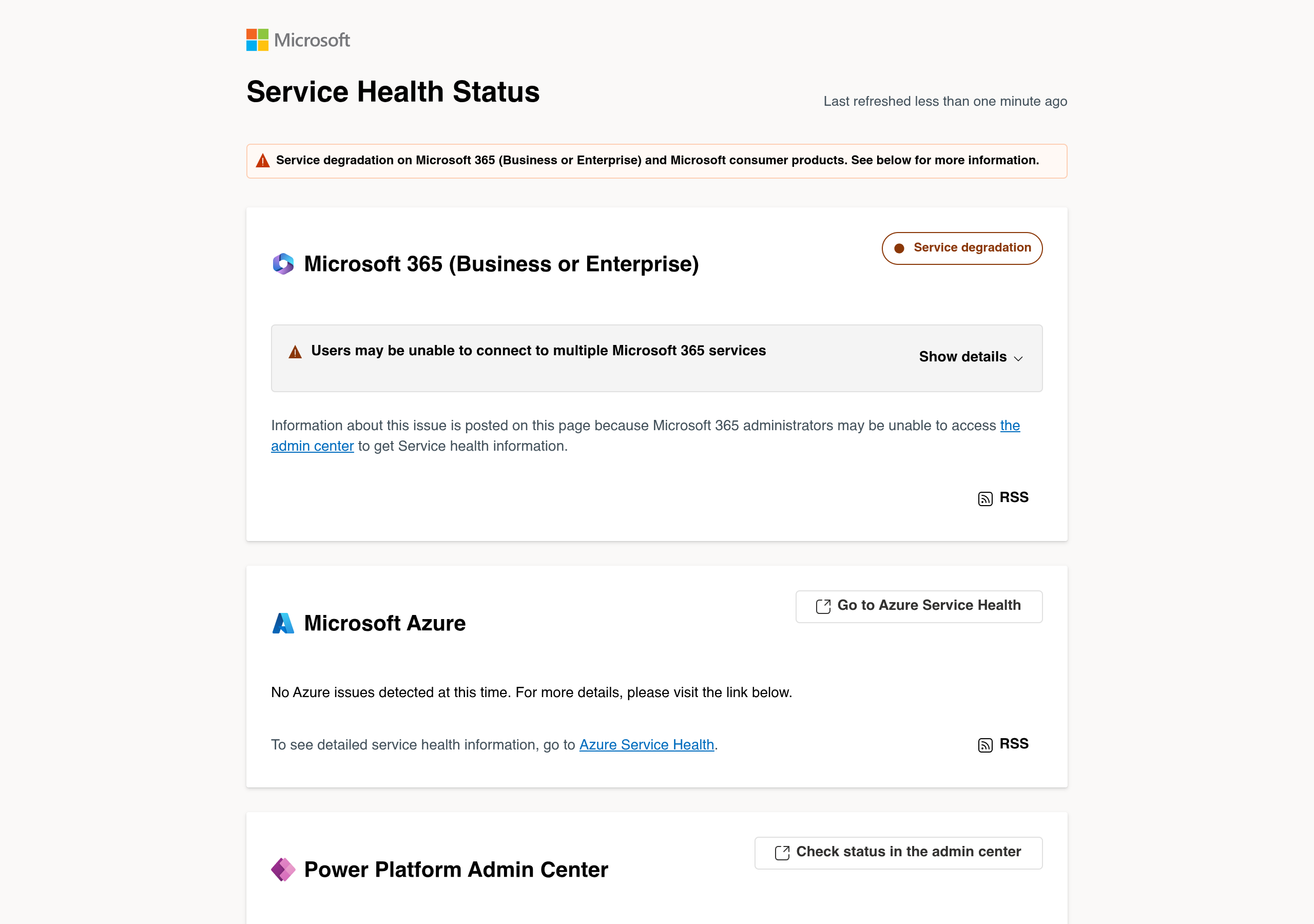
| 13 Nov, 06:17 UTC (11:17 am PKT) | Microsoft's latest update still lists the incident as "Service degradation". The company says it is evaluating traffic throttling, protocol changes and failover routing. |
| 13 Nov, daytime | Microsoft extends the email timeout to 48 hours to preserve mail delayed by the outage. Recovery continues, but the outage is not declared fixed. |
The most important thing to understand about this outage is that it is not a single moment of failure. Microsoft has restored servers more than once, only for those servers to fail again when normal traffic returns. That is why the outage has now entered its second day, and why Microsoft has not given a time for full recovery.
Which Microsoft Services Are Affected?
Outlook has been hit hardest, but the outage reaches across Microsoft 365. Here is the picture from Microsoft's own status updates.
| Service | Status | What users see |
|---|---|---|
| Outlook (web, desktop, mobile) | Down or degraded | Mailboxes will not open; email is delayed or will not send |
| Exchange Online | Down or degraded | Mailbox access fails; mail delivery is delayed |
| Microsoft Teams | Partly affected | Calendars and scheduling do not work properly; other features may fail |
| Microsoft 365 Copilot | Down or degraded | AI assistant features fail or are unavailable |
| SharePoint | Partly affected | Features that rely on Exchange Online do not work |
| Microsoft Graph, Planner, To Do | Partly affected | Features that depend on email and Exchange fail |
| Intune, Purview, Power BI | Partly affected | Some features disrupted, according to Microsoft's incident list |
| Microsoft Defender XDR | Partly affected | Some security features disrupted |
| Microsoft Azure | Working | Microsoft's status page reports "No Azure issues detected at this time" |
Microsoft has also said that features of Microsoft 365 services that do not depend on Exchange Online and email remained functional. So the outage is not a total blackout of everything Microsoft makes — it is centred on email and everything connected to email. That is still a very large part of how businesses work every day, which is why this outage has caused so much disruption.
How Big Is the Outage?
This is one of the largest Microsoft outages of recent years, measured by the number of people reporting problems.
Downdetector, the independent website that tracks outages from user reports, logged more than 130,000 Outlook problem reports in the United States at the peak, around 1 pm Eastern Time on Thursday. At the same time, reports were coming in from 74 countries and territories, including the United States, the United Kingdom, India, Australia and Japan. By 7 am GMT on Friday, Downdetector had still received at least 43,000 Outlook problem reports from users in 72 countries.
Microsoft has not confirmed how many users are affected in total. The company serves hundreds of millions of Microsoft 365 users worldwide, and not every customer is affected — but the spread across 74 countries shows this is a global incident, not a local one.
The real-world impact has gone beyond office email. In India, the airline IndiGo said its email support services were affected by the global disruption. In Japan, the government's shared email network was disrupted. In the United Kingdom, government engineers were asked to help Microsoft apply a routing configuration patch. There were also reports of connectivity problems for AI platforms such as OpenAI and Anthropic during the outage.
For businesses, the cost is lost working hours. People could not read or send email, could not join meetings from their calendars, and could not use Copilot. Government agencies and large companies that run on Microsoft 365 were hit just as hard as small businesses.
What Caused the Microsoft Outage?
Microsoft has not yet published a confirmed root cause. That is the honest answer, and any website that tells you the exact cause today is guessing. Here is what Microsoft has actually said.
Microsoft said a portion of its infrastructure was "experiencing elevated load" across multiple regions, and that this was likely contributing to the connectivity errors. The company later said a number of servers had become unexpectedly unavailable, and that the elevated load had not been caused by an increase in traffic — in other words, this was not a case of too many people using Outlook at once.
The core problem, as Microsoft has described it, is that restored servers "can become unresponsive again once they receive traffic". Engineers are analysing diagnostic data to work out what triggers that behaviour. Microsoft has also said that a process on the affected servers that handles secure connections becomes overwhelmed, after which those servers stop responding.
Because restarts were not holding, Microsoft moved to other measures: limiting which types of traffic can reach the affected infrastructure in some locations, rebuilding a subset of servers on a previous configuration to test whether that stops them going unresponsive, adjusting traffic protocols, redistributing traffic, and adding extra capacity. Microsoft says it is seeing partial recovery in regions where these measures are in place — but partial recovery is not stable service, and users in those regions may still see intermittent failures.
Microsoft has promised a Post-Incident Report once the incident is mitigated. That report will be the final word on what went wrong.
Was It a Cyberattack?
No — according to Microsoft, this outage was not caused by a cyberattack.
Microsoft said: "As of now, we are not aware of any malicious activity that is causing this incident." Charles Lamanna, a senior Microsoft executive, confirmed that there was "no indication this is the result of malicious or cyber activity". The Australian Home Affairs and Cyber Security Minister, Tony Burke, also said Microsoft believed it was not dealing with a cyberattack.
That matters, because a cyberattack would mean your data might be at risk. Nothing Microsoft has said suggests that user data was stolen or that accounts were broken into. This is an infrastructure failure — Microsoft's own servers failing under load — not a hack.
One warning still applies: during a big outage, scammers send fake emails and messages pretending to be Microsoft support, offering to "fix" your account. Microsoft will never ask for your password by email or phone. Do not click links in messages about the outage that did not come from Microsoft's official status page.
Is Hotmail Down Too?
Yes — Hotmail is down as part of the same Microsoft outage. If you cannot sign in to Hotmail, or your Hotmail inbox will not load, this is why.
Many people do not realise that Hotmail and Outlook.com are the same service. Microsoft's own help page says plainly that Hotmail is now Outlook.com, and that you reach an old Hotmail account by signing in at outlook.com. Your @hotmail.com address, your @live.com address and your @outlook.com address all run on the same Microsoft mail system — Exchange Online — so when that system fails, every one of them fails together.
That is why "hotmail down", "hotmail not working" and "hotmail login problem" all started trending at the same time as "microsoft outage" and "outlook outage". Microsoft's consumer notice named Outlook.com among the services hit by the outage, and mail servers began answering delivery attempts to Outlook.com, Hotmail, Live, MSN and Office 365 addresses with temporary errors from about 17:30 UTC on 12 November 2026. Tracking sites logged more than 21,000 problem reports for Microsoft Outlook (Hotmail) in 24 hours.
The same rules apply to Hotmail as to Outlook. Your Hotmail mail is delayed, not lost. Do not delete your Hotmail account or try to create a new one during the outage, and do not trust any message that claims your Hotmail account will be closed unless you click a link — that is a scam. Just wait for Microsoft to restore the service, and check the status page to see when it is back.
One more thing Hotmail users should know: if someone sends you an email from Gmail or another service while the outage is running, their mail server may warn them that delivery to your Hotmail address was delayed. That warning is normal during this outage. It does not mean your Hotmail account is broken or closed.
How to Check If Outlook Is Down
Before you restart your computer, reinstall Outlook, or change any setting, check whether the problem is Microsoft's. These three checks take less than a minute, and they will save you from breaking a working setup.
1. Check Microsoft's Service Health Status page. Go to status.cloud.microsoft in your browser. This is Microsoft's public status page. If it shows "Service degradation" on Microsoft 365 (Business or Enterprise) and Microsoft consumer products, Outlook is down for everyone — not just for you. This page is the fastest official check, and it works even when the Microsoft 365 admin center does not load.
2. Check Downdetector. Search for "Downdetector Outlook" and open the Outlook status page. Downdetector shows a live graph of user reports. A sudden spike in reports means the outage is real and widespread. A flat line means the problem is probably on your side.
3. If you are an admin, check the Microsoft 365 admin center. Sign in at admin.microsoft.com, go to Health, then Service health, and open incidents EX1550543 and MO1550821. Each incident has a feed of every update Microsoft posts, and the time of the next update. Microsoft points customers to incident MO1550821 in the admin center, and to status.cloud.microsoft if the admin center is unavailable.
If all three checks show a Microsoft problem, stop troubleshooting your own computer. The fault sits in Microsoft's infrastructure, so local fixes will not restore service.
What to Do While Outlook Is Down
There is no fix you can apply yourself, because the problem is not on your computer. But there are sensible things you can do while you wait.
Try another way of opening Outlook. If the desktop app will not open your mailbox, try Outlook on the web, or the Outlook mobile app — or the other way round. Recovery is uneven, so one way in may work while another does not. If none of them works, the service is still down for you.
Do not delete your account or reinstall Outlook. During an outage, deleting and re-adding your email account can make things worse, because the account may fail to set up again while the servers are down. Leave your settings exactly as they are.
Do not resend the same email again and again. Email sent during the outage is delayed, not lost. Microsoft has extended the email timeout to 48 hours to preserve delayed mail. Sending the same message five times means the other person may receive it five times once service returns.
Use another channel for urgent messages. If something cannot wait, call the person, send a text message, or use a personal email account. Teams chat may work for some people, but Teams calendars and scheduling are also affected, so do not depend on Teams alone.
If you run a business, tell your team and your customers. A short message — "Our email is down because of the global Microsoft outage, we will reply as soon as service returns" — stops customers thinking you are ignoring them. Airlines, government offices and large companies did exactly this during the outage.
If you are an IT admin, track the incidents and check your SLA. Follow EX1550543 and MO1550821 in the admin center for Microsoft's updates. Business customers may also be able to claim service credits under Microsoft's service-level agreement if the outage lasts long enough — check the SLA terms in your admin center and keep a note of when the outage affected your organisation.
When Will Outlook and Microsoft 365 Be Fixed?
Microsoft has not given a timeline for full recovery. That is the honest answer, and it is the same answer Microsoft has given since the outage began.
What Microsoft has said is that as capacity returns, users may see service come back gradually as their apps reconnect, rather than all at once. Some users already have their mailboxes back. Others are still waiting. Recovery is happening region by region, and some servers that were restored have failed again.
As of the latest update we checked on 13 November 2026, Microsoft still listed the incident as "Service degradation", and the outage had entered its second day. Microsoft's most recent updates say engineers are "engaged in multiple workstreams to alleviate impact, address our current blocker, and returning portions of service infrastructure back to a healthy state".
The best way to know when it is fixed for you is to keep checking the status page at status.cloud.microsoft. When Microsoft marks the incident as resolved, and your mailbox opens normally, the outage is over for you. Until then, treat any single successful login as a good sign, not a guarantee — the service has gone down again before after a partial recovery.
Frequently Asked Questions
1. Is Outlook still down?
As of the latest update we checked on 13 November 2026, yes — Microsoft still lists the incident as "Service degradation" and has not declared it fixed. Some users have their mailboxes back, but recovery is partial and uneven. Check the live status at status.cloud.microsoft, because the situation can change at any time.
2. Is the Microsoft outage a cyberattack?
No. Microsoft says it is "not aware of any malicious activity" behind the outage, and a senior Microsoft executive confirmed there is "no indication this is the result of malicious or cyber activity". The cause is an infrastructure failure on Microsoft's servers, not a hack.
3. Why is Outlook not working?
Because of a global Microsoft 365 outage that began on 12 November 2026. A portion of Microsoft's infrastructure is experiencing elevated load, servers have become unexpectedly unavailable, and restored servers go unresponsive again once they receive traffic. The problem is on Microsoft's servers, not on your computer.
4. Which services are affected by the Microsoft outage?
Outlook (web, desktop and mobile) is hit hardest, along with Exchange Online mail delivery. Teams calendars and scheduling, Microsoft 365 Copilot, SharePoint features that rely on Exchange, Microsoft Graph, Planner, To Do, Intune, Purview, Power BI and Defender XDR are also affected. Microsoft Azure is working normally.
5. Is my email lost?
No. Email sent during the outage is delayed, not lost. Microsoft has extended the email timeout to 48 hours to preserve delayed mail. Do not resend the same email again and again — the other person may receive it several times once service returns.
6. How do I check if Outlook is down or if it is just my computer?
Open status.cloud.microsoft in your browser. If it shows "Service degradation" on Microsoft 365, Outlook is down for everyone. You can also check Downdetector's Outlook page for a live graph of user reports. Admins can check incidents EX1550543 and MO1550821 in the Microsoft 365 admin center.
7. When will Outlook be back?
Microsoft has not given a timeline. Recovery is happening gradually, region by region, and some restored servers have failed again. Microsoft says users may see service return gradually as their apps reconnect. Keep checking the status page for the latest update.
8. Can I get compensation for the Microsoft outage?
Business customers may be able to claim service credits under Microsoft's service-level agreement, depending on how long the outage affects them. Check the SLA terms in your Microsoft 365 admin center and keep a note of the disruption. Home users of the free Outlook service do not have a paid SLA, so no compensation applies to them.
9. Is Hotmail down as well?
Yes. Hotmail is now Outlook.com — Microsoft's own help page says you reach an old Hotmail account by signing in at outlook.com — and Outlook.com is part of this outage. So if your Hotmail inbox will not load or you cannot sign in, it is the same problem, with the same fix: wait for Microsoft to restore the service. Your Hotmail mail is delayed, not lost.
Related Guides



Final Thoughts
The Microsoft outage of November 2026 is a reminder of how much of the working world runs on one company's email. Outlook, Teams and Copilot stopped working for users in 74 countries, and after more than a day Microsoft still had not fixed it — not because engineers were not working, but because restored servers kept failing again under load.
For most people, the right response is simple: check the status page, wait, and do not break your own setup trying to fix a problem that is not yours. Your email is delayed, not lost. And remember that this was not a cyberattack — your data was not stolen, and your account was not hacked.
We will update this guide if Microsoft publishes its Post-Incident Report or declares the outage fully resolved. Until then, the live status page at status.cloud.microsoft is the one place to trust.